Fix Redirect Error in Google Search Console by following these simple steps. If Google Search Console is showing a redirect error, it means Googlebot is unable to follow your page redirects correctly.
This can stop your pages from being indexed and can badly affect SEO.
In this guide, you will learn why redirect errors happen and step-by-step ways to fix them safely.
This guide will help you fix redirect error in Google Search Console step by step.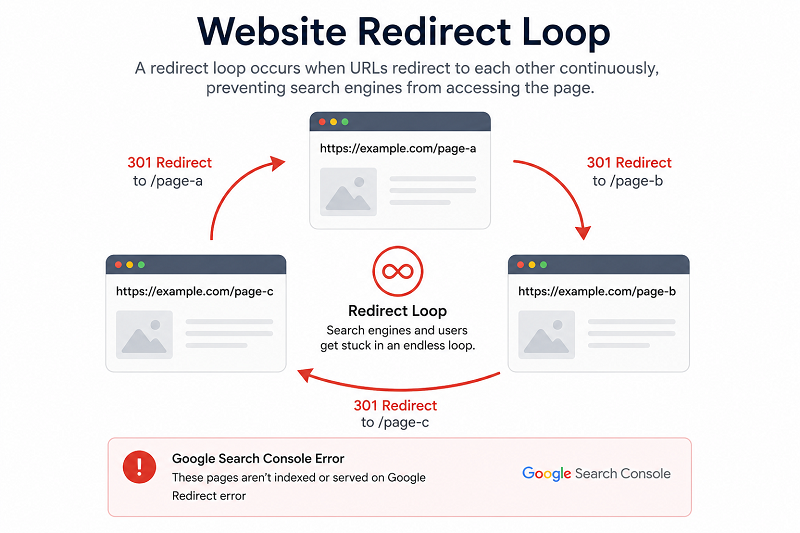
What Is a Redirect Error in GSC?
A redirect error happens when:
- The redirect chain is too long
- A redirect loop exists
- Broken or incorrect redirect setup
Google gives up crawling the page.
Common Reasons for Redirect Errors
Redirect Loop
Page A → Page B → Page A
Google cannot reach the final page.
👉 Related indexing issue guide:
Too Many Redirects
Multiple redirects slow crawling and cause errors.
👉 Redirect + SEO issue:
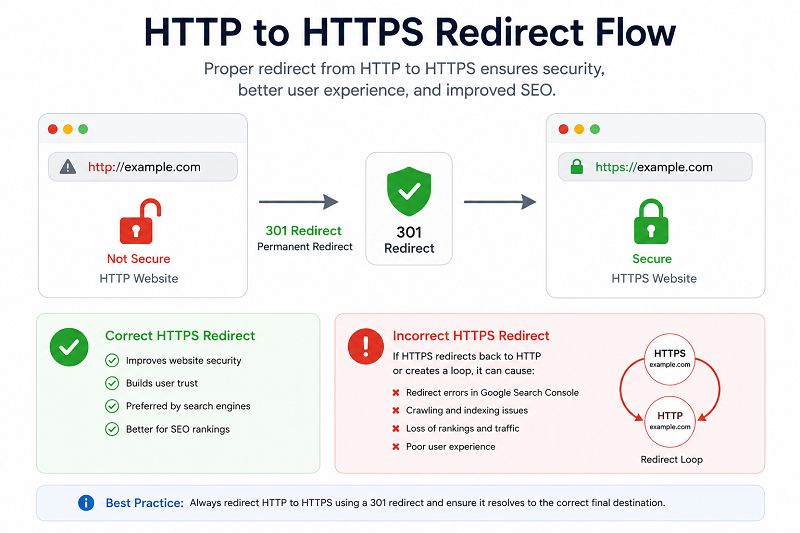
HTTP to HTTPS Misconfiguration
Wrong SSL or mixed redirects can trigger errors.
Step-by-Step Fix Redirect Error in GSC
Step 1 – Check Redirect Chain
Use tools to see how many redirects exist.
Keep only one redirect
👉 https://developers.google.com/search/docs/crawling-indexing/301-redirects

Step 2 – Fix Redirect Loops
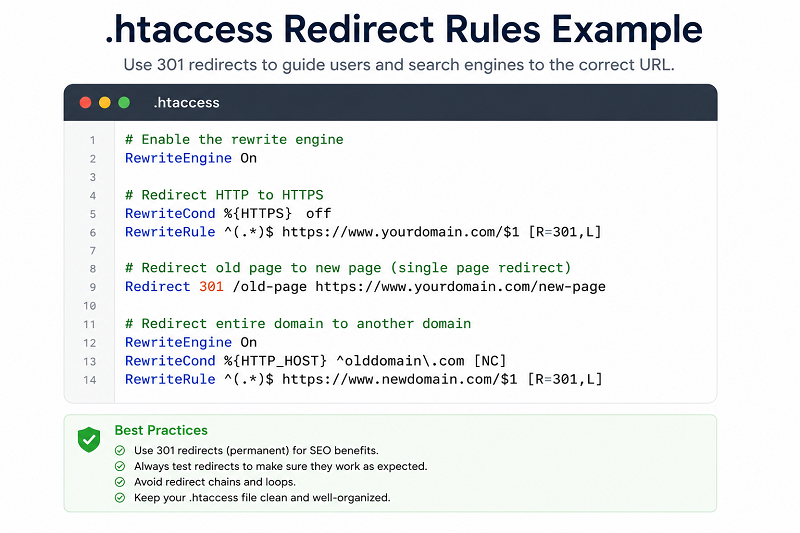
Remove circular redirects from .htaccess or a plugin.
👉 Learn how to fix crawled currently not indexed:
Step 3 – Use Correct Redirect Type
- 301 → Permanent
- 302 → Temporary
The wrong type can confuse Google
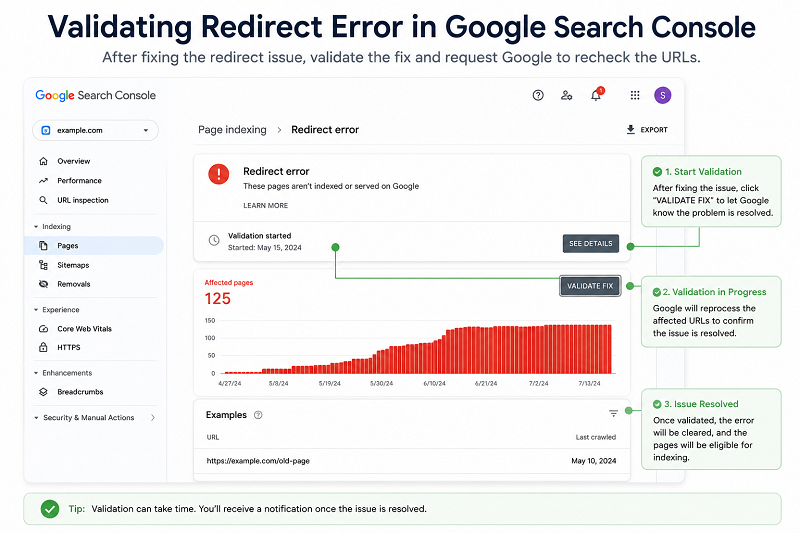
How to Validate Redirect Errors in Google Search Console
Steps:
- Open GSC
- Pages → Redirect Error
- Click Validate Fix
- Wait for recrawl
👉 https://support.google.com/webmasters/answer/7440203
How Long Does Google Take to Update?
- Crawling: 3–7 days
- Index update: 1–3 weeks
Do not change redirects repeatedly.
Need Professional SEO Help?
If redirect errors continue after fixing your website configuration, professional SEO support can help identify redirect chains, loops, and technical issues.
👉 Get Professional SEO Help:
SEO Services: https://problemfixer.net/seo-tools-services/
WordPress Services: https://problemfixer.net/wordpress-services/
AI Tools Services: https://problemfixer.net/ai-tools-services/
Conclusion
Redirect errors stop Google from reaching your pages.
By fixing redirect loops, reducing chains, and using correct redirect types, you can fully solve this issue.
Once fixed, Google will crawl and index your pages normally again.
If redirect errors still appear after validation, review your redirect rules again and make sure every URL points directly to the correct destination.❓ FAQs
Is a redirect error bad for SEO?
Yes, it blocks indexing.
Can plugins cause redirect errors?
Yes, misconfigured plugins can create loops.
Should I delete redirect error URLs?
No, fix them instead.
How many redirects are safe?
Only one redirect is best.
What is the difference between a redirect chain and a redirect loop?
A redirect chain passes through multiple URLs before reaching the final page, while a redirect loop keeps sending users back to the same URLs without reaching a destination.