Introduction – Install WordPress
Many people want to create a website but do not know where to start.
The good news is that installing WordPress is very easy, even for beginners.
WordPress is the most popular website platform in the world.
In this guide, you will learn how to install WordPress step by step for beginners using simple words.
You do not need technical skills to follow this guide.

What Is WordPress?
WordPress is a free website platform.
It helps you create blogs, business websites, and online stores.
You do not need coding to use WordPress.
More than half of the websites on the internet use WordPress.
What You Need Before Installing WordPress
Before installing WordPress, you need:
- A domain name
- Web hosting
- Internet connection
Most hosting companies offer one-click WordPress installation.
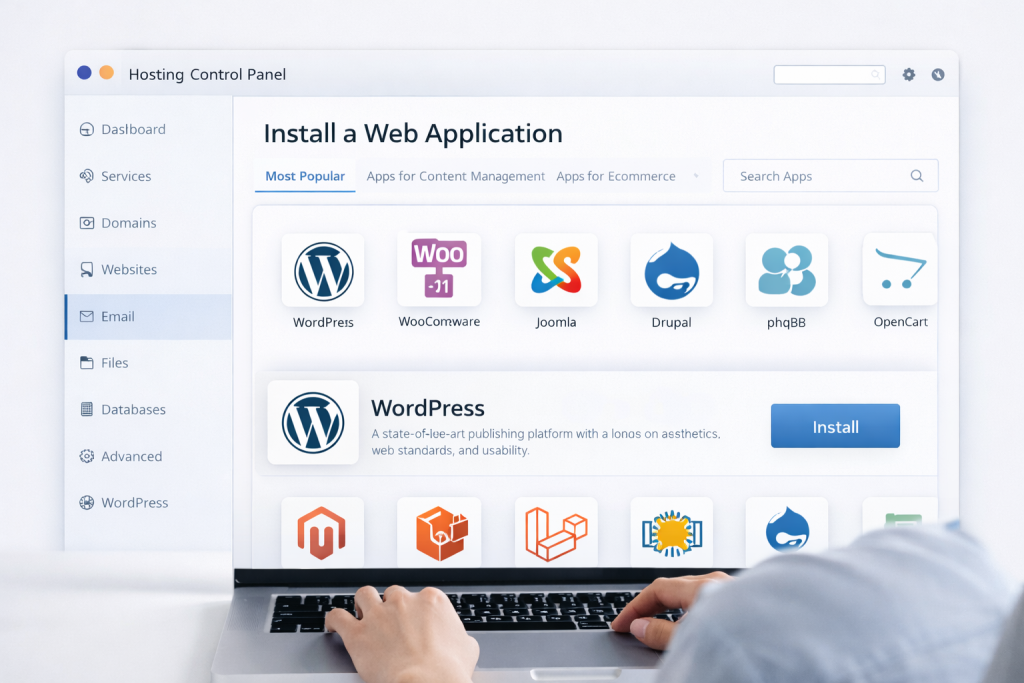
Method 1: Install WordPress Using Hosting Control Panel (Easy Way)
This is the best and easiest method for beginners.
Step 1: Login to Hosting Account
Open your hosting dashboard.
Look for cPanel or Hosting Control Panel.
Step 2: Find WordPress Installer
Click WordPress, Softaculous, or Website Installer.
Step 3: Start Installation
Click Install.
Choose your domain name.
Step 4: Set Login Details
Enter:
• Website name
• Admin username
• Strong password
Step 5: Complete Installation
Click Install and wait a few seconds.
WordPress will be ready.
Method 2: Install WordPress Manually (Advanced)
This method is optional.
Beginners can skip this.
Download WordPress
Download from official site.
Upload Files to Hosting
Upload WordPress files using File Manager or FTP.
Create Database
Create database from hosting panel.
Run Installation Script
Open your domain and follow setup steps.
After Installing WordPress – Important Settings
Once WordPress is installed, do these steps:
• Change admin password
• Set website title
• Set timezone
• Delete default post
How to Login to WordPress Dashboard
To login, open:
yourdomain.com/wp-admin
Enter username and password.
Common Problems After WordPress Installation
Some common issues are:
• Website not loading
• White screen
• Slow website
How to Make WordPress Website Fast and Safe
After installation:
• Install SEO plugin
• Use fast hosting
• Keep WordPress updated
Does WordPress Need SEO Setup?
Yes.
SEO helps Google find your website.
Basic SEO setup is very important.
https://developers.google.com/search/docs/fundamentals/seo-starter-guide
✅ Helpful Hosting Options for WordPress
Reliable hosting makes WordPress faster, safer, and easier to manage.
Beginners should choose hosting that offers one-click WordPress installation and good support.
As your website grows, you can explore professional hosting options for better performance.
Prefer an official option?
Some users prefer to buy directly from the official website.
You can check the official source here:
[Official Link / Affiliate Link – optional]
You’re free to choose the official option above, or contact us if you want the same tool set up for you at a lower cost.
Need Any Tool or Service?
If you need any AI tool, SEO tool, WordPress plugin, or theme at a low price, just message us on WhatsApp.
Tell us what you need, and we’ll confirm availability and the best affordable price.
Contact us on WhatsApp Need help or want a tool at a low price?
Our Services
WordPress Services: https://problemfixer.net/wordpress-services/
AI Tools Services: https://problemfixer.net/ai-tools-services/
SEO Tools Services: https://problemfixer.net/seo-tools-services/
Conclusion
Installing WordPress is simple and beginner-friendly.
You can create a website in minutes without coding.
Follow these steps carefully and your website will be ready.
After installation, focus on content and SEO.
FAQ
Q1: Is WordPress free to install?
A: Yes, WordPress is free to download and install, but you need hosting and a domain.
Q2: Can beginners install WordPress without coding?
A: Yes, beginners can install WordPress easily using one-click installation from hosting.
Q3: Which method is best for beginners?
A: Installing WordPress using the hosting control panel is the easiest and safest method.